Introduction
Go 1.26 introduces a powerful new go fix subcommand that helps you keep your code modern and consistent. One of its standout features is the source-level inliner—a tool that can replace function calls with the actual function body right in your source code. Combined with the new //go:fix inline directive, this enables package authors to define their own API migrations that users can apply automatically. In this step-by-step guide, you’ll learn how to use //go:fix inline to simplify upgrades and refactoring across your Go projects.

What You Need
- Go 1.26 or later – the
//go:fix inlinedirective is only supported from this version. - A Go project with at least one reusable function you want to inline.
- Basic familiarity with Go syntax and the command line.
- (Optional) An editor with gopls for interactive inline previews.
Steps to Use //go:fix inline
Step 1: Understand Source-Level Inlining
Before diving in, grasp what source-level inlining means. Unlike compiler inlining (which optimizes machine code behind the scenes), source-level inlining permanently modifies your source files. It replaces a call like sum(a, b) with the body of sum, substituting the arguments. The result is a straightforward, human-readable change that you can commit. This is especially useful for migrating to new APIs or eliminating deprecated wrappers.
Step 2: Write a Target Function
Create a simple Go package with a function you’d like to inline. For example:
package mathutil

// Add returns the sum of two integers.
func Add(x, y int) int {
    return x + y
}
Step 3: Add the //go:fix inline Directive
Just before the function declaration, insert the comment //go:fix inline on its own line:
package mathutil

//go:fix inline
func Add(x, y int) int {
    return x + y
}
This directive tells go fix that every call to Add in your project should be replaced with the function’s body wherever possible.
Step 4: Call the Function from Another Package
In a separate package (or main), import mathutil and call Add:
package main

import "example.com/mathutil"

func main() {
    result := mathutil.Add(3, 4)
    println(result)
}
Step 5: Run go fix
Open a terminal, navigate to your module root, and execute:
go fix ./...This command recursively applies all known go fix modernizers, including the source‑level inliner. After running it, open your main.go – you’ll see that the call has been replaced:
package main

func main() {
    result := 3 + 4
    println(result)
}
Step 6: Verify Correctness
Because go fix is conservative and respects scoping rules, the transformation is safe. Still, always run your tests:
go test ./...If any test fails, review the inlined code for name clashes or side effects. The inliner automatically renames local variables when needed to avoid conflicts.
Step 7: (Optional) Use gopls Interactive Inlining
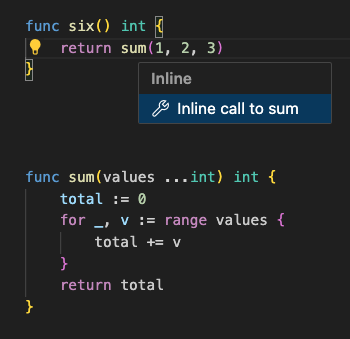
If you prefer manual control, place your cursor on a function call in your editor and trigger the “Inline call” code action (available in VS Code and other editors supporting gopls). This uses the same inliner under the hood, but only for that single call site.
Step 8: Create Your Own Self-Service Modernizer
As a package author, you can use //go:fix inline to ease migration for your users. For instance, if you deprecate OldFunction in favor of NewFunction, mark OldFunction with the inline directive. Then your users run go fix and their code is automatically updated to use the new logic directly – without changing their imports or rewriting manually.
Tips for Best Results
- Only inline simple, pure functions. Functions that have side effects, closures, or complex control flow may produce unexpected results after inlining. The tool is safest for small, stateless helpers.
- Test before and after. Always run your test suite after applying
go fixto catch any subtle issues early. - Combine with version control. Create a commit or stash before running
go fixso you can review the diff easily. - Use judiciously. Over‑inlining can harm readability. Reserve
//go:fix inlinefor functions that are truly meant to be replaced at the call site (e.g., small wrappers or deprecated APIs). - Consult the Go documentation. For advanced usages (like inlining methods or functions with generics), refer to the official Go 1.26 release notes and the
go fixdocumentation.
By following these steps, you can harness the power of source-level inlining to automate API migrations, reduce boilerplate, and keep your Go codebase modern with minimal effort. Happy fixing!